ShackAssistant
Guide › Contesting

Contesting

A contest log is a normal logbook with the contest stored in it: open the file and you are in the contest. The contest rules come from a .ctd file, the same kind N1MM uses - the organiser's own, or one from a collection you downloaded.

First

The definition: get the .ctd

A .ctd file is a small text file that describes a contest: what you exchange, what a QSO is worth and what counts as a multiplier. The ones on the download page work in ShackAssistant as they are, and one written here still works in N1MM.

That is the CTD principle from N1MM Logger+, used as it is - not a format of our own that resembles it. Definitions are written once, by people who read the rules carefully, and then shared; thousands already exist. A second format would mean all that work over again and an operator having to ask which program a file came from. CTD does the job, so it is what the standard should be - and honouring it costs nothing.

If a definition uses a section list (a .sec file with the valid exchange values, such as provinces or districts), you need that file too. Without it the score comes out too high, and you get a warning.

Once per contest

Making the log

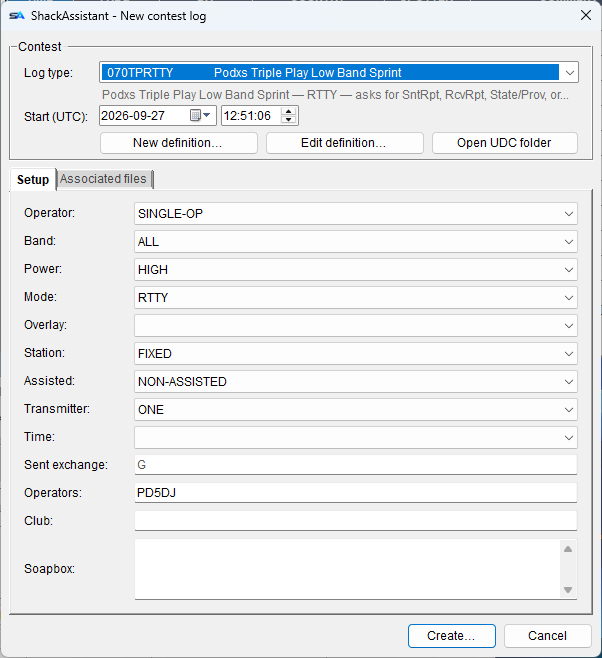
File → New logbook → contest log, or New… in the network logbook window for a log on the server. You fill this in once.

What it asksWhat it is
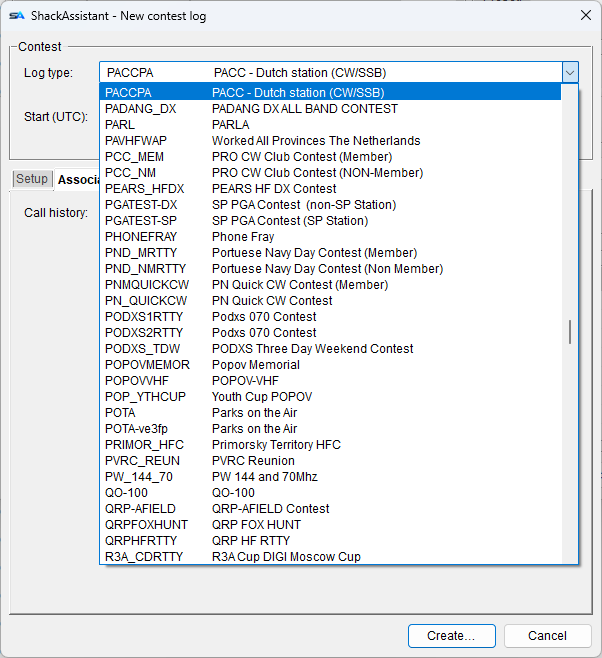
Log type Every .ctd in the CTD folder, short name and full name. The line under it says what the contest asks for: BOTH - asks for Snt, Rcv, Exch.
Start (UTC) Date and time the contest starts, in UTC.
Your categories Operator, band, power, mode, overlay, station, assisted, transmitter and time, plus operators, club and soapbox. This is your Cabrillo header, so the export asks nothing later.
Sent exchange What you send after the report. {SERIAL} is a serial number that counts from 001 by itself. Or type what you send - a section, an age, a power. 599 {SERIAL} 14 works too. The grey text in the box is only an example, and Create asks you about it if you leave the box empty while an example is showing - grey text is not an answer.
Call history On the second tab: a file with what stations sent in earlier contests. It fills in the boxes for you.
Create… Then your station details, and where to save the file.

The window only shows the exchange fields this contest uses. Pick a contest that wants nothing but a report and the exchange row is gone - caption, box and the height of the row - instead of sitting there greyed out. A box that is never filled in is a question you keep answering in your head.

Open CTD folder on the definition row opens the folder, so you can drop a file in.

During

The window changes shape

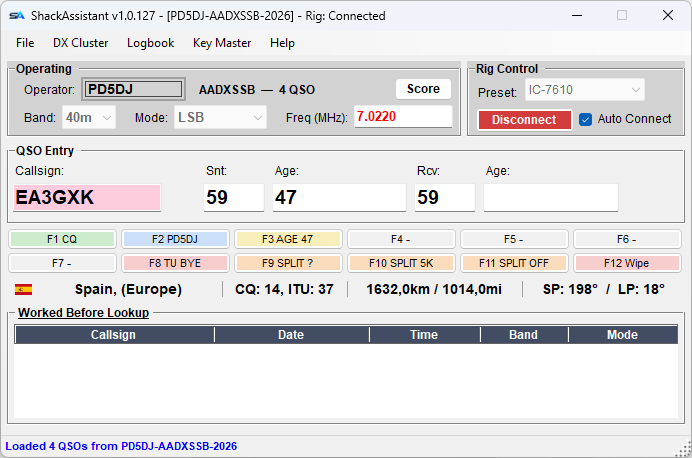
In a contest log the main window changes:

  • One entry row with captions above it: callsign, reports, exchanges and whatever else the contest wants, in the order the definition gives.
  • Twelve message keys under the row - see Message keys.
  • My Station becomes Operating: operator, contest name, QSO count, a Score button, and band, mode and frequency.
  • Date and time, name, comment, satellite and propagation are hidden. The clock keeps running.
  • Enter logs once the entry is complete. If something is missing, you are told which field.
  • Tab visits only the entry boxes and skips your own sent exchange.
  • No QRZ lookups during a contest.
  • Key Master changes with it. Its quick log grows the same boxes the contest asks for, the right-click menu on the decoded text offers them, and the comment box steps aside - so a CW or RTTY contest can be worked entirely from that one window.
The main window in contest shape: Operating frame, one entry row with captions, and the message keys
Contest shape. Score is one button away.
During

While you work

Dupes

A dupe is a station you already worked, and that does not count again.

New multipliers

Multipliers are things like countries or call areas. Your points are multiplied by how many you have, so a new one is worth a lot.

Help with typing

During

Serial numbers

Many contests ask you to send a serial number: 001 for your first QSO, 002 for the next.

A number you have sent is used up. A gap in your numbering costs nothing at the log check; two QSOs with the same number do.

Where you stand

The score

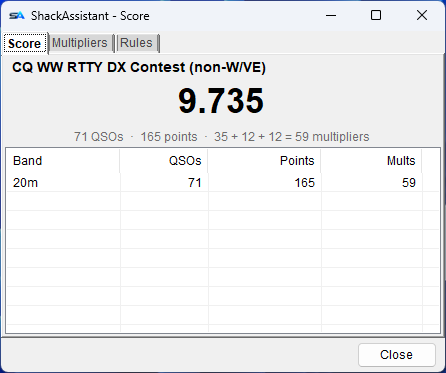
The Score button on the Operating frame. The score is recalculated from the log after every QSO.

TabWhat is on it
Score The contest, the total big enough to read from across the shack, and how it is made up: 71 QSOs · 165 points · 35 + 12 + 12 = 59 multipliers, with the dupes added to that line when there are any. Underneath, a table per band: QSOs, points and multipliers, in band order - 160, 80, 40 and not 10, 15, 160 the way plain text sorts. Which file the score was computed from is on the tooltip of the contest name.
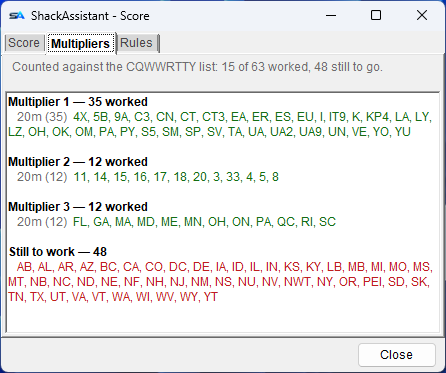
Multipliers Every multiplier you have, as running text per band - so you read down 40 m and see what is on it, and a value you have on two bands stands in both lines. The line at the top counts: 15 of 63 worked, 48 still to go. When the contest has a list, what is left to work is spelled out underneath in red.
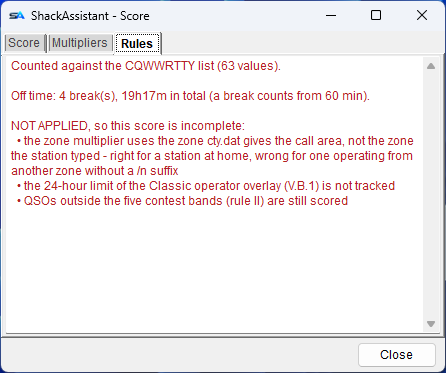
Rules The section list in use, the category limits (off-time, band changes) and, in red, anything in the definition that is not applied.

A score is never quietly wrong. If the definition holds a rule that cannot be applied, the Rules tab says so.

While it runs

Live on the scoreboard

ShackAssistant can put your score on Contest Online ScoreBoard while you are working, so you and everyone else can see how the contest is going.

  1. Make an account on the scoreboard, and a profile for the contest you are entering. It only accepts a score for a contest your profile lists.
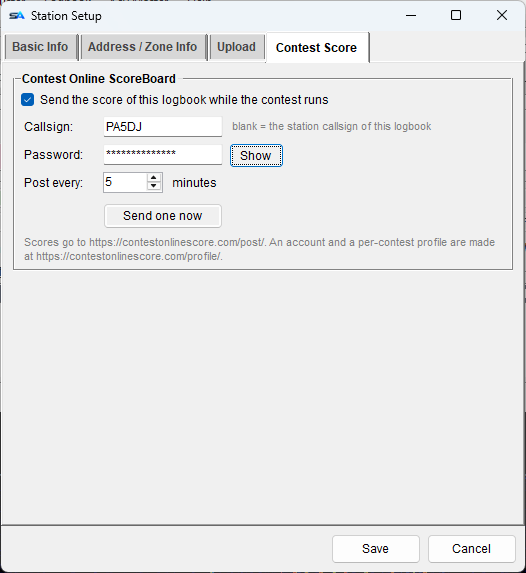
  2. Open the contest logbook, then Station Setup → Contest Score: tick Send the score of this logbook while the contest runs and fill in your password. Leave the callsign blank to post under the station callsign of this logbook.
  3. Send one now posts a single score, and asks first - do that before the contest starts, so you know it works.

After that it posts by itself, every few minutes, only while a contest log is open. It sends the same numbers the Score window shows: your total, and the QSOs, points and multipliers broken down per band and mode - which is the shape the scoreboard draws its graphs from.

It can never get in the way of logging. The posting happens off the path a QSO takes, so a scoreboard that is slow or unreachable costs you nothing - you get one line saying so, not a dialog in the middle of a run.

Set per contest logbook, and off in every new one. A score therefore only ever goes out under the account of the log it belongs to - never the score of one call under another.

Station Setup, Contest Score: callsign, password and how often the score of this logbook is posted
Station Setup → Contest Score. Nothing is sent until you tick the box.
Sending it in

The Cabrillo file

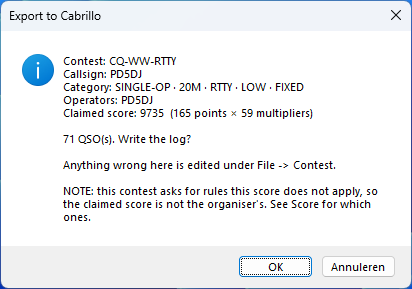
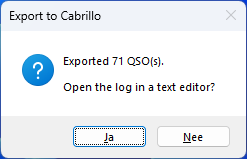
Cabrillo is the file format contest organisers ask for. In the logbook window, choose File → Export to Cabrillo (only in a contest log). It asks almost nothing: the header comes from what you filled in when you made the log, and the claimed score is calculated for you.

  • The QSO lines use the layout from the definition.
  • Problems are reported: a QSO without a valid date is left out, and an empty report or exchange is written as a dash.
  • If a rule is not applied, or the section list is missing, you are warned before the file is written.
  • The organiser's special instructions, if the definition has them, are shown after the export.

Your ARRL section travels with it. Fill it in once under Station Setup → Address & Zone Info - DX if you are outside W/VE - and the export writes LOCATION: DX in the header and puts it in the column behind your sent exchange on every QSO line, which is what contests like CQ WW RTTY ask for. You do not send it on the air: a DX station sends 599 14, and the column is only how the log is written. Leave the field empty and the file is exactly as it was.

Multi-Op: the transmitter column

A MULTI-OP entry with ONE or TWO transmitters has to say on every QSO line which transmitter made it - that is how the organiser checks the ten-minute rule. The category decides whether the column is there, not the name of the contest: the same contest is entered single-op by one operator and multi-op by the next, and a 0 that does not belong is as wrong as a missing one.

  • It is stamped when you log, not worked out at export time. Which machine drives which transmitter is a choice, not a consequence of the rules, and halfway through a contest somebody may re-patch a cable.
  • Set it per machine in a contest log. Two machines claiming the same transmitter is said once, on the spot - not once every few seconds.
  • Nothing is invented. An empty field leaves the column empty and is counted in the report, exactly like the location column: an incomplete QSO stays visibly incomplete.
  • Older QSOs can be filled in, and you are asked rather than told - with No as the default button. Guessing would produce an entry that looks right and has the ten-minute rule checked against the wrong thing.

Where a QSO was made, and on which radio

In a contest log every QSO also records the machine it was made on and, if the file it came from said so, the radio number. Both are columns in the logbook (switched off by default) and both are searchable and editable in Bulk edit.

  • The machine name is not the same thing as the transmitter. The transmitter is the station's; the machine is where the QSO was typed - and it stays with the record however often it travels between PCs afterwards.
  • The radio number is read and kept, never stamped by us. ShackAssistant drives one radio, so there is nothing to choose; putting a 1 everywhere would be a number that says nothing. It is there so an imported N1MM log does not lose it.
  • What ShackAssistant writes carries its own name in the ADIF (APP_SHACKASSISTANT_STATION, APP_SHACKASSISTANT_RADIO); what it reads also accepts N1MM's tags, because without those an N1MM log cannot be imported.

For contest QSOs in an ordinary logbook, or a contest log from elsewhere, you fill the header in by hand. It remembers what you typed.

Export to Cabrillo: the header and claimed score before the file is written
What will be written, before it is written.
What comes out
START-OF-LOG: 3.0
CONTEST: PACC
CALLSIGN: PA5DJ
CATEGORY-OPERATOR: SINGLE-OP
CATEGORY-MODE: MIXED
CLAIMED-SCORE: 30600
QSO: 14025 CW 2026-02-14 1522 PA5DJ         59  NH     PA6HQ         59  012
END-OF-LOG:
When there is none

Writing a definition

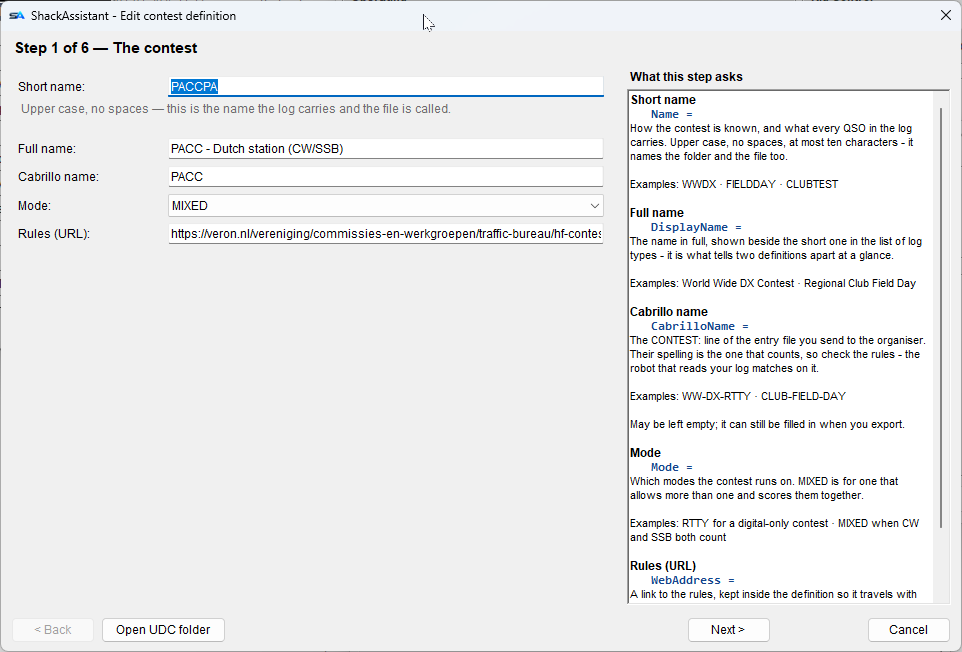
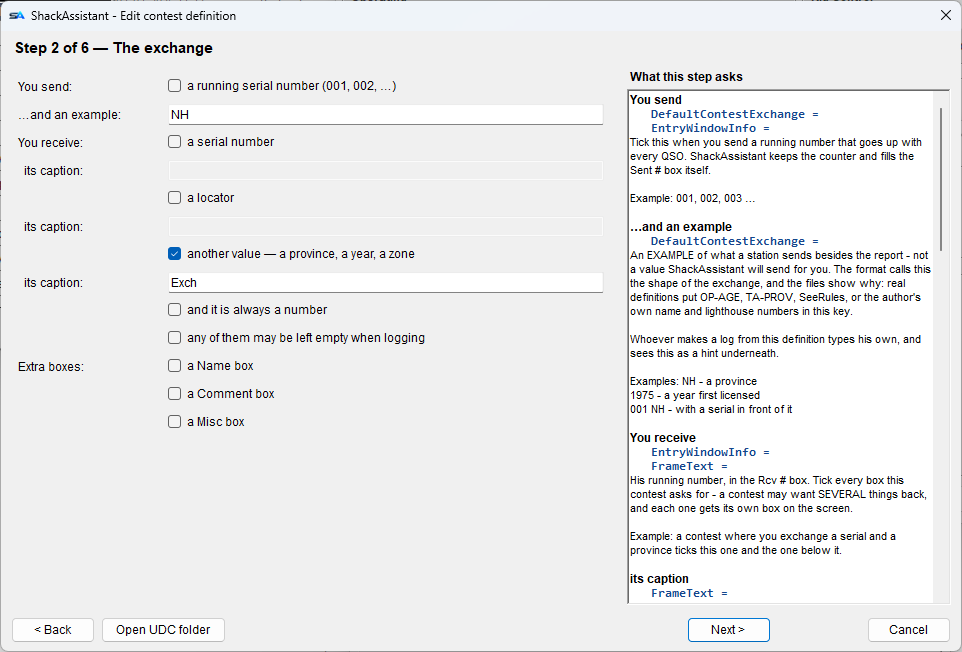
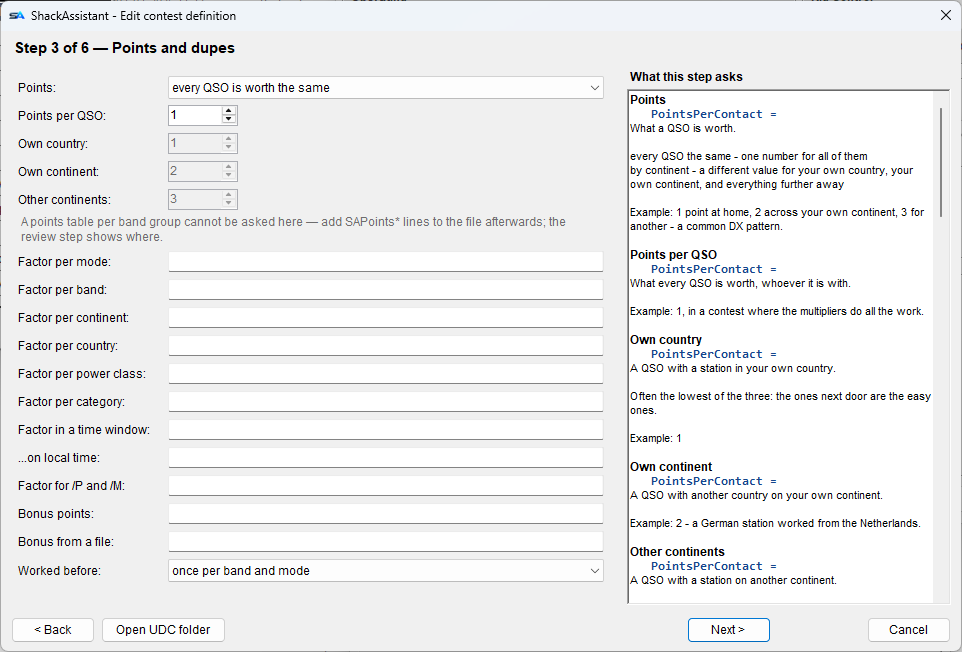
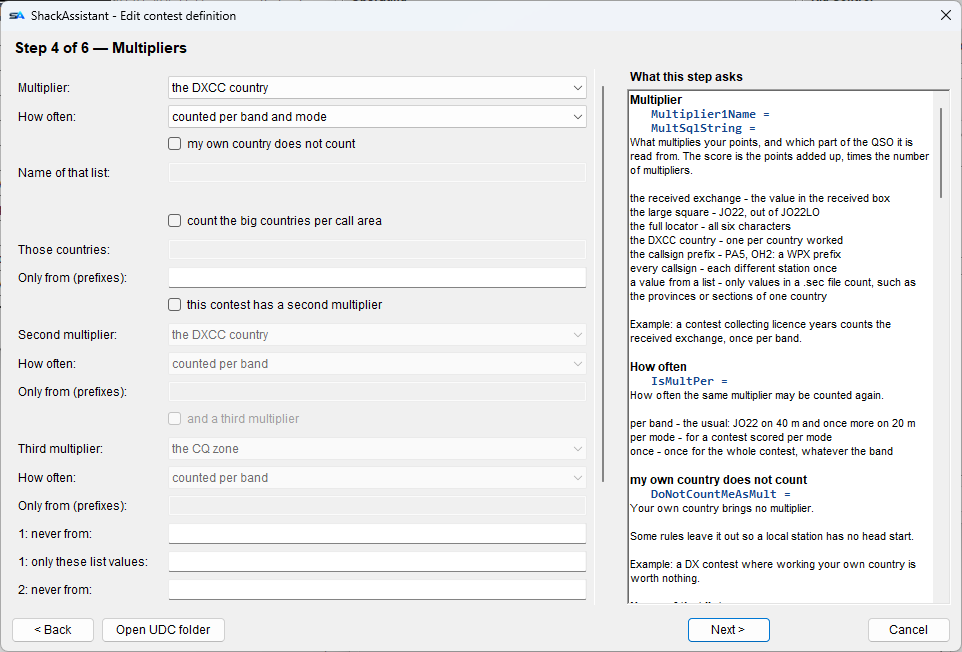
For a contest without a .ctd, or with a wrong one: New definition… or Edit definition… on the contest window opens an editor in six steps:

  1. The contest - short name, full name, the Cabrillo name, the mode and a link to the rules.
  2. The exchange - what you send and receive: a serial, a locator or another value, whether it must be a number or may be empty, and extra boxes for name or comment.
  3. Points and dupes - what a QSO is worth (fixed, or per continent, country, band, mode, power or time of day), bonus points and the dupe rule.
  4. Multipliers - up to three: country, prefix, zone, locator, section list, call area… and how often each counts.
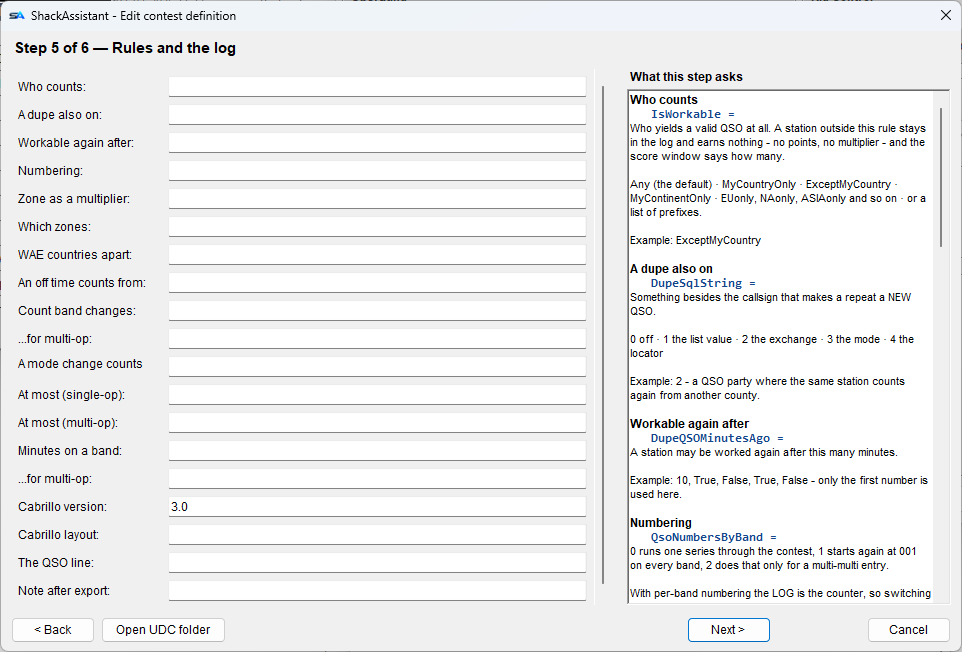
  5. Rules and the log - who may be worked, serials per band, off-time and band-change limits, and the Cabrillo layout.
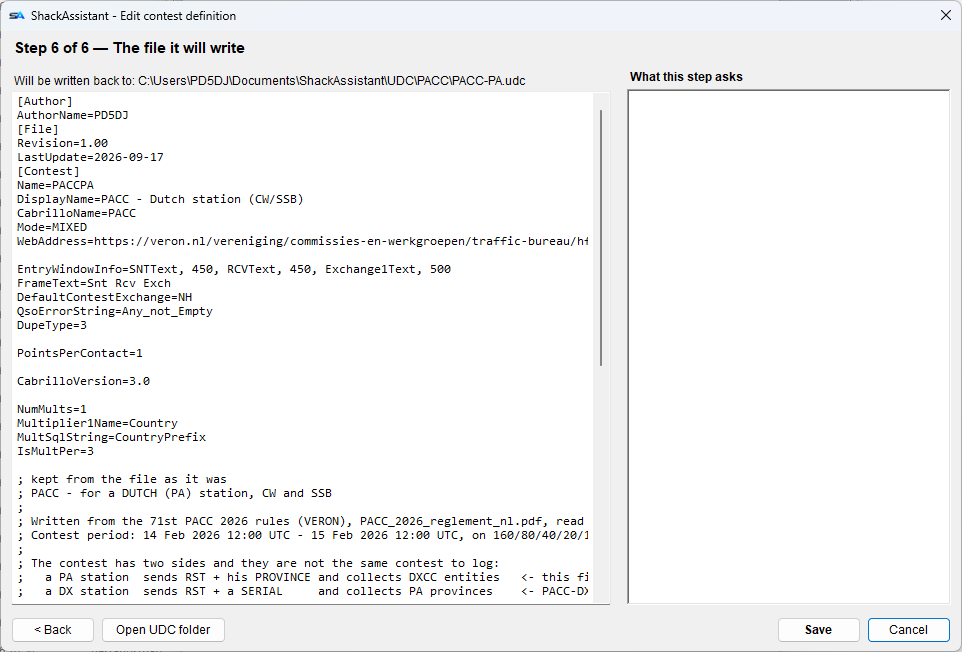
  6. The file - the .ctd itself, which you can still edit by hand before saving.
  • The panel on the right explains each step and shows which CTD key each box writes.
  • Editing keeps what the editor does not know: comments, unknown keys and hand-written tables stay as they were.
  • In an existing contest log the log type is locked. A different contest needs a new logbook.
A definition, as the editor writes it
[Contest]
Name=PACCPA
DisplayName=PACC - Dutch station (CW/SSB)
CabrilloName=PACC
Mode=MIXED
EntryWindowInfo=SNTText, 450, RCVText, 450, Exchange1Text, 600
FrameText=Snt Rcv Exch
DefaultContestExchange=NH
DupeType=3            ; per band AND per mode
PointsPerContact=1
NumMults=1
Multiplier1Name=Country
MultSqlString=CountryPrefix
IsMultPer=3
CabrilloVersion=3.0

Plain text, one key per line. The few extra keys ShackAssistant adds are skipped by N1MM, so the file still works there.

Two radios, two operators

More than one machine

Machines in one shack find each other on the local network by themselves and share their QSOs. Nothing to type in. It works with a file, a local database or a logbook on a server.

All of it is on the Multi-Op & network logbook page.

When it is over

Afterwards

  1. Check the score, and read the Rules tab: anything red there is a rule that was not applied.
  2. Export to Cabrillo and send it in.
  3. Export to ADIF as well, and import that into your everyday logbook if you keep one. The import asks about duplicates, so nothing goes in twice.
  4. Keep the contest log. Open it next year and the contest is all there, and it works as a call history for the next edition.

File → Contest lets you change the contest of the open log: a category, the soapbox or the next serial number. Only the log type is fixed.

File - Contest: editing the contest of the logbook you have open
The same window as when the log was made, with the log type locked.

The other guides