| Frame | What is in it |
|---|---|
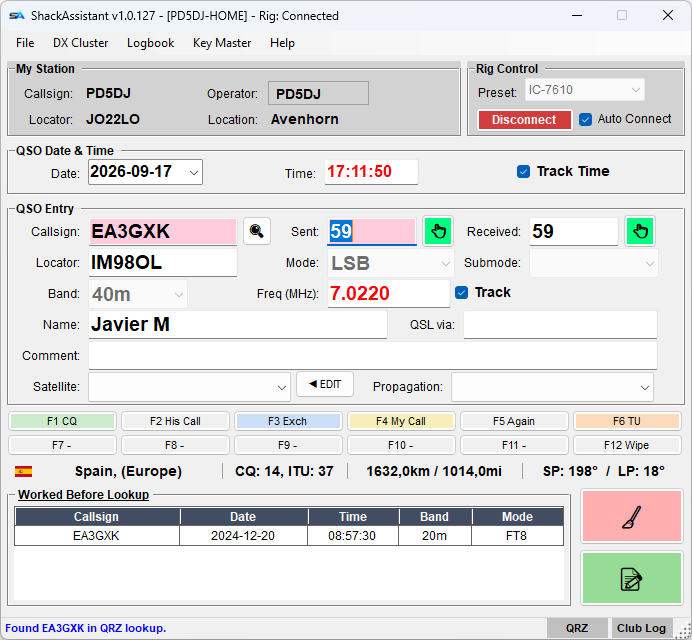
| My Station | Your callsign, operator, locator and location, set in Station Setup. Operator, locator and location are buttons: press one to change it, for example to hand over to another operator or when you are portable. |
| Rig Control | Pick your radio preset and press Connect, or tick Auto Connect - see Rig control. |
| QSO Date & Time | Always in UTC (world time, as used in every log). With Track Time ticked it follows the clock; untick it to type a date and time yourself, for example from a paper log. |
| QSO Entry | The contact you are logging - see below. |
| Message keys | F1–F12, under the entry, in a contest. See Message keys & voice keyer. |
| DXCC Info | The country and more, worked out from the callsign - see the country line. |
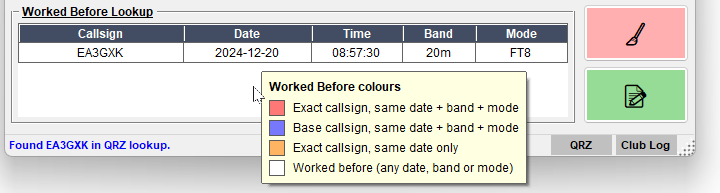
| Worked Before | Your earlier QSOs with this station - see below. |
| Status bar | Tells you what just happened, in a few words. Click it, or use Help → Status messages…, for the full history. |
In a contest log the window looks different - see Contesting.